Posts

Vlocity Facts #31 || Calling Integration Procedure asynchronously from Omniscripts and Integration Procedures

Image
An asynchronous process is a process or function that executes a task "in the background" without the user having to wait for the task to finish. Omniscripts: By using Non-Blocking, Fire and Forget, Use Future, Use Queueable we can Integration procedure in asynchronous mode. Non-Blocking — Runs asynchronously, and the response is applied to the Ul.  When Invoke Mode is set to non-blocking, elements using default values will not receive the response because the element loads before the response returns. Fire and Forget — Runs asynchronously with no callback to the Ul. A response will still appear in the debug console but will not be applied to the Data JSON. Use Future — Specifies that the Integration Procedure runs asynchronously, as a Salesforce future method, which can return no data to the calling OmniScript. Use Queueable  — Which runs in Async mode, which have higher governor limits. Integration Procedure:  If a Child IP need to be called in Async m...

Vlocity Facts #30 || Environment Variables in DataRaptors and Integration Procedures

Image
To define Default Values and Filter Values, and in Formulas we can use environment variables. Interview question with example. 1. How to pass current user id to DataRaptor or Integration Procedure? We can get userId from omniscript and we can pass it to DataRaptors and Integration Procedures or we can get userId by using Environment variables. Omniscript         W e can pass userId by using merge syntax %userId% to DataRaptor or Integration Procedures. Environment Variable             W e can pass ' $Vlocity.UserId ' to get the user details  2. How to filter dates in DataRaptor using literal dates?                                  By using environment variables we can filter the dates.                                  ...

Vlocity Facts #29 || How to call Omniscript from Utility Items

Image
 If there is a use cause where users need quick access to omniscripts where they can launch from any app or any record page in salesforce. For this kind of requirement we can call omniscripts from utility items. For example users need to see their contact information or update contact information from app page or record page. Step1: From setup search for App Manager and open your custom app or any standard app [according to your requirement]. Step2: After opening App navigate to utility items and click on 'Add Utility Item'. Step3: Select 'Vlocity LWC OmniScript Wrapper' by searching and name it according to your requirement.  Step4: If required change the Icon, Panel Height or Panel Width and select the omniscript. You can pause the values in the form of query string or an object and save the changes.

Vlocity Facts #28|| How to use QUERY() function in DataRaptors with static and dynamic values

Image
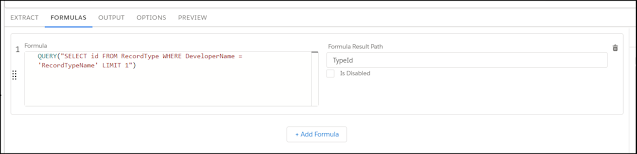
We can use SOQL in QUERY() function to fetch the details in DataRaptors or Set Values. 1. Static Value -- We can write query on recordtype by using formula tab in DataRaptor. In the above screenshot by using Query function I'm getting recordtype id from Formula Result Path we can use that for mapping in out put tab. 2. Dynamic Value -- For example we need to pass any values to the query which we are getting from other actions or based on other record then we can follow this approach. Here I'm passing Account Id,  Priority   to get related case numbers of the account.  QUERY ( "SELECT CaseNumber FROM Case WHERE Priority = '{0}'AND AccountId = '{1}'  LIMIT 3" ,  Priority ,  Case : AccountId ) Priority = '{0}' -- This holds the Account Priority in our case it holds 'Medium' AccountId = '{1}' -- This holds the accountId {0}, {1} holds the values of what we are mentioning after que...

Facts #27 || CSS Tricks and scenarios related to Community Portal

When we are developing community portal by using OOTB functionalities. In some scenarios we need to hide the fields, buttons, list views from desktop and mobile. Will discuss some scenarios and CSS what can be used to make that scenario possible. To find the CSS class you need to search CSS class by inspecting the community page. ---------------------------------------------------------------------------------------------------------------------------- Scenario 1: If you are using case object page layout on community portal and business asked to remove the status field from the page layout [view and edit mode] but status field is required field and we can't hide this field from profiles and page layouts.  Solution:  Create one section in page layout and add status field to that section. To hide that section which contains status use below CSS to hide that section from page layout in Community portal // nth-child(n) -- nth section of the page layout you can replace the n value...

Vlocity Facts #26 || Can we display files with out using LWC and file related list?

 Yes we can display the files with out using LWC but we need to write triggers and we can display with the help off Flexcard. When we upload a file it will create 3 records. Content Version -- where the version of the file stores. ContentDocument is the parent object of ContentDocumentId, ContentVersion where it can store the versions of the file. ContentDocumentLink -- It will be the link between the Parent object [LinkedEntityId] and the ContentDocument object To achieve our task we need to have the link of the file and it is should be download url. ContentDistribution Object Represents information about sharing a document externally.  First when ever a ContentDocumentLink record is created we need to make the record Visible to all users. trigger MakeFileVisible on ContentDocumentLink (before insert) { for(ContentDocumentLink l:Trigger.new) {        l.Visibility='AllUsers'; } } and after the ContentDocumentLink is created we can create the ContentDistribu...